Table of Contents
How to: Add a Vocabulary to a Record or Template
Quick Steps
- Put your cursor on the 'Element label' that is directly below where you want your new vocabulary to be inserted (go here instead, if the vocabulary is to be inserted at the end of the record/template)
- Press the <Insert> key
Insert an existing vocabulary
To choose from a list of already assigned local vocabularies appropriate for the entity (if there are any):
- Click on the empty Element Label box, and then the down arrow to choose from a list
- Select an existing vocabulary
- <Tab> to complete the step
Create a new (local) vocabulary
To create your own list of vocabulary terms for an element
- Click on the empty Element Label box, and enter a vocabulary name
- <Tab>
- Indicate “What Kind of data is this?”: Vocabulary
- Indicate the Source of the vocabulary
- Indicate the Kind of vocabulary for the data
- Click <Submit>
Detailed Steps
Needs work — Deborah 2014/09/30 00:51
To add a local vocabulary of your own to a template:
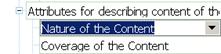 Put your cursor on the vocabulary label that is directly below where you want your new vocabulary to be inserted (go here instead, if the vocabulary is to be inserted at the end of the record/template:

- If your new vocabulary is a parent vocabulary, put your cursor on a parent vocabulary label
- If your new vocabulary is a sub-vocabulary, put your cursor on a sub-vocabulary vocabulary label in the same group
- You can move the vocabulary after you insert it, if you wish
- Press the <Insert> key; a blank box will appear
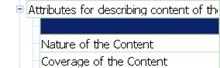

Either: Choose from a list of already assigned local vocabularies appropriate for the entity (if there are any)–(this works for templates and records)
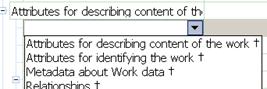 Click on the empty Element Label box, and then the down arrow on its right
 - Select a vocabulary label
- <Tab> to complete the step

Or: Enter a local vocabulary name–(this only works for templates)
- Click on the empty Element Label box, and enter a vocabulary name

- <Tab>
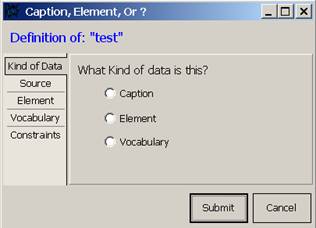 Click the Vocabulary button to indicate “What Kind of data is this?” (use this for an element that has a list of terms for its data; this allows you to set up a list of common terms, so that the user can either choose from the list, or (if it is an open vocabulary) enter a new term)
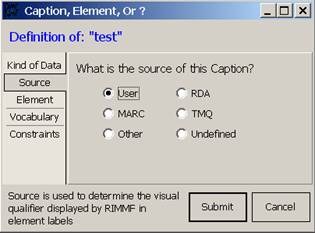 Indicate the Source of the Vocabulary, e.g., “User” (do not use RDA or TMQ as a Source)
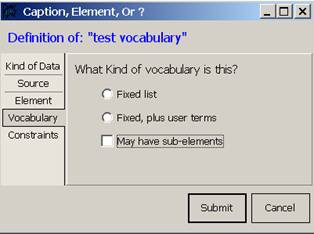 Indicate the Kind of vocabulary for the data:
- Fixed list—the user will only be able to choose from the closed list of terms that you provide
- Fixed, plus user terms—the user will be able to choose from the open list of terms that you provide, or enter a term of their own
- May have sub-elements—either way (fixed or fixed plus) the vocabulary might have sub-elements, that can be used to provide more detailed terms than the general terms provided in the parent vocabulary
- Click <Submit>
- The system will add an appropriate vocabulary symbol for the source of the vocabulary, to the end of the label, e.g., “‡” = MARC


You will be able to change these vocabulary settings later using Edit Vocabularies

In a template: if you would like an added vocabulary to always appear for a particular type of record, then add that vocabulary in a template; the added vocabulary will always appear whenever that template is accessed.
In a record: do not add a vocabulary to a record; if you do, then that new vocabulary will show up as 'undefined' the next time you open the record. Only add new vocabularies to templates, so that the software knows what to do with the data for that vocabulary, the next time you access a record that contains that vocabulary data.